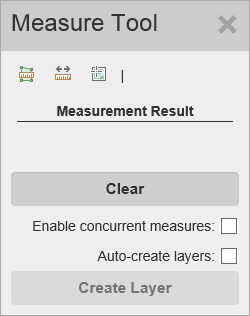
The Measure Tool window appears when you select Measurement from the Tools menu.
The Measure Tool window contains the following controls:
 (Area) - Click the Area button to find the area contained within a region you define.
The unit of measure appears on the right of the buttons. Click the unit of measure to display a drop down list, where you can select other units.
Click here to display a list of available units of measure.
 (Distance) - Click the Distance button to find the distance along a path you define. The unit of measure appears on the right of the buttons. Click the units to display a drop down list, where you can select other units.
Click here to display a list of available units of measure.
 (Location) - Click the Location button to find the lat/long coordinates of any point on the map. The lat/long format appears on the right of the buttons. Click the format to display a drop down list, where you can select other option.
Click here to display a list of available lat/long formats.
Clear - Click this button to remove any measurements from the map.
Enable concurrent measures - Click this checkbox to measure multiple areas or distances. As you draw new areas or lines, the measure tool will display the running total of all measurements.
Note: This control is not available when Location is selected.
Caution: If you want to create a drawing layer while performing an Area measurement, you must close the polygon by double-clicking at the start point. If you only double click without closing the polygon, you will receive an accurate measurement. However, the drawing layer will be added to the map as an unclosed polygon. The drawing layer only displays the lines you have drawn.
Auto-create layers - Click this checkbox to automatically add measurements you create to a drawing layer. The drawing layer displays the measurement on the map, and the description on the Legend displays the numeric measurement in selected units.
Create Layer - Click this button to manually add the current measurements to a drawing layer. The drawing layer displays the measurement on the map, and the description on the Legend displays the numeric measurement in selected units.
Note: This control is not available when Location is selected. This control is only enabled when Enable concurrent measures is checked.
 (Close) - Click this button to close the Measure Tool window.